











<img src="https://secure.leadforensics.com/51974.png" style="display:none;">

SAP integration for real-time control of financial processes

A SAP integration connects your ERP environment with additional systems and solutions, enabling real‑time synchronisation of data and processes. With an integration with SAP, you create a seamless ERP integration where financial transactions, documents and master data are automatically exchanged. Real‑time synchronisation improves accuracy, reduces errors and increases control over financial processes.

A SAP integration can be applied across SAP ECC and R3 (on‑premise), SAP Business One and SAP S/4HANA Public and Private Cloud. The clean‑core approach is maintained: SAP remains the stable ERP foundation while surrounding processes are automated without compromising system integrity.
 

ERP profile enrichment_SAP

Benefits of a SAP integration

Icon_Time to Value_blue

Efficiency and fewer manual tasks

A SAP integration automates repetitive activities such as data transfer and transaction processing. This improves efficiency, reduces manual tasks and lets finance and procurement teams focus on value‑adding work. 

Icon_Realtime insights_purple

Compliance & control

Standardised workflows, approvals and audit trails help you meet regulatory requirements. A SAP integration strengthens compliance and gives greater control over financial processes. Real‑time synchronisation eliminates shadow administration and supports timely reporting such as real‑time VAT returns. 

Icon_Higher compliance_pink

Real-time visibility with minimal IT effort

With real-time visibility into financial data, you always have up-to-date information. This helps in monitoring expenses, monitoring budgets and making more informed decisions. At the same time, interfacing with SAP requires little IT capacity, keeping implementation and management manageable and allowing teams to focus on core activities.

Technical steps of a SAP integration

A successful SAP integration requires a structured approach. The steps below show how data, systems and processes are technically aligned for secure and efficient data exchange.

1. Analysis & data mapping

2. Connection via SAP API integration

3. Real-time synchronisation

4. Automate invoice processing

5: Payment management & monitoring

Sage_Step 1

1. Analysis & data mapping

Define which master data, transactions and processes are included, along with the data structures and definitions. 

Sage_Step 2

2. Connection via SAP API integration

Establish a secure and scalable link using SAP API integration to exchange data. Where applicable, SAP CI can be used to ensure secure, scalable data exchange in line with SAP standards. 

Sage_Step 3

3. Real-time synchronisation

Configure real‑time synchronisation so that data is updated immediately and validated across connected systems. 

Header_ISPnext_DACH

4. Automate invoice processing

Automate invoice registration, validation and preparation for approval and posting. 

Sage_Step 5

5: Payment management & monitoring

Align status updates and support payment management with proper logging and error handling.

Wouter Jelier - Louwman Group
"The seamless integration between ISPnext and SAP helps us better control financial processes and set up invoice processing more efficiently."

Wouter Jelier, Finance Executive | Louwman Group

Live with ERP: from SAP data to a smarter Source-to-Pay process

With SAP ERP integration, organisations can go live with ERP and use SAP data in real time across the entire Source‑to‑Pay process. From requisition to payment, data flows seamlessly, enabling financial automation, shorter cycle times and efficient collaboration. The integration supports end‑to‑end Source‑to‑Pay while preserving the SAP clean core, keeping the ERP system stable, upgradeable and future‑proof. 
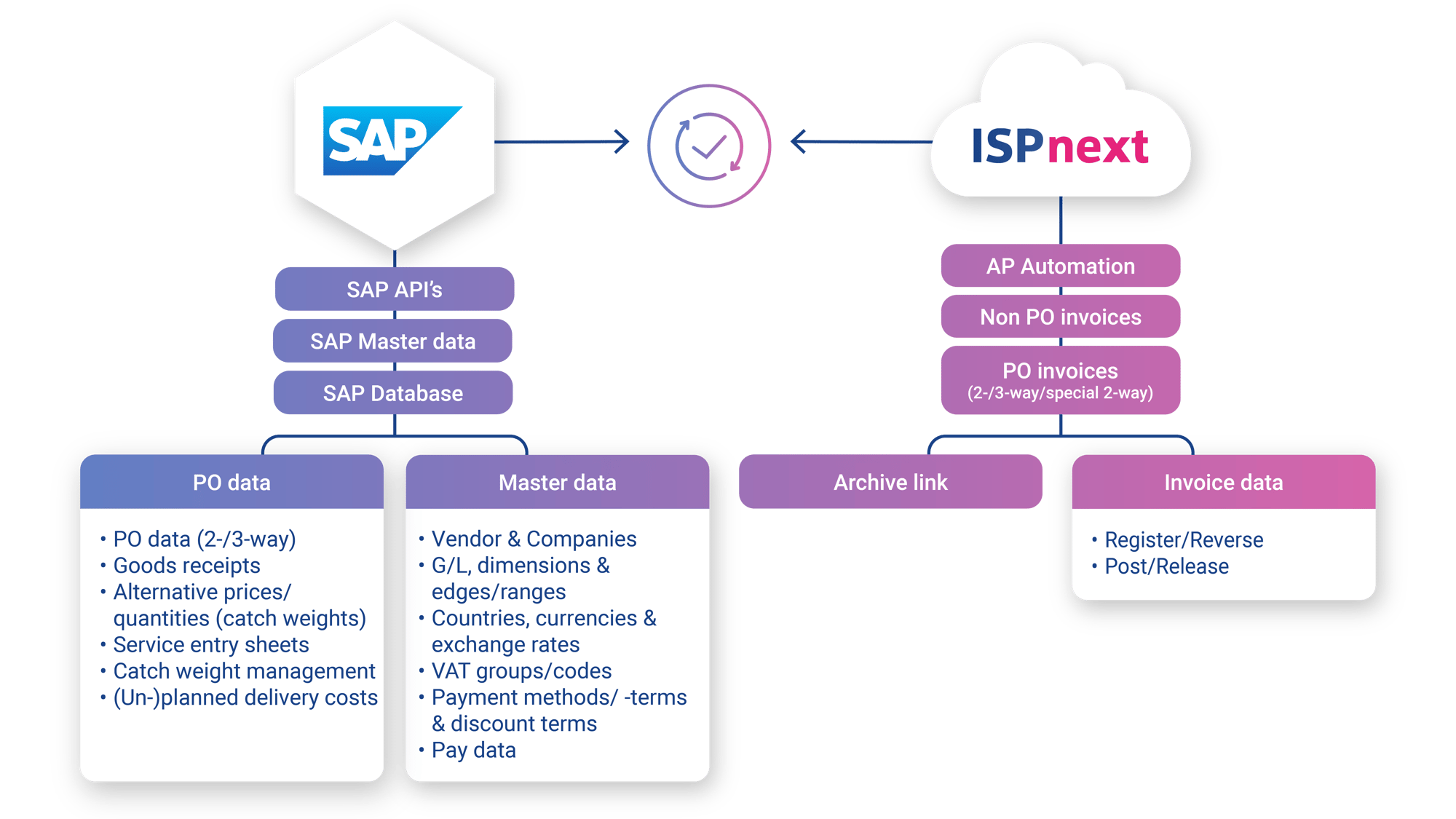
Functionalities of the SAP integration

  • 2-way matching of invoices and orders

  • 3-way matching including goods receipt

  • Payment management and status handling

  • Archiving of documents and audit information

  • Automate invoice processing from intake to approval

  • Service Entry Sheets

  • Additional charges (planned and unplanned)

  • SAP ArchiveLink

  • Payment date feedback

  • G account management

  • Support for SAP FI (Finance) and SAP MM (Order Management)

ISPnext - Dataflow - Connector - SAP

Which organisations is SAP integration suitable for?

Finance

Teams that need reliable figures, process control and support for compliance obligations. 

Procurement

Teams aiming to standardise purchasing processes and gain better visibility into spend and commitments. 

Growing organizations

Organisations that require scalable ERP integrations to support increasing volumes and complexity. 

Customer stories about SAP integration

Read customer stories about SAP integration and discover how organizations are achieving financial process automation with ERP integration. Practical experiences show how efficiency, control and transparency improve.

Icon_AP automation_2x_cropped

AP Automation in line with SAP Clean Core

Download the white paper and learn how organizations are using SAP to replace manual AP processes with smart automation, without compromising the Clean Core principle.

Mockup_Preview_Whitepaper_AP & SAP (ENG)

Frequently asked questions about SAP integration

What is a SAP integration?

A connection between SAP and other systems to automate processes and enable real‑time data synchronisation. 

What data can be synchronised through a SAP integration?

Typical master data, financial transactions, invoice data and status information. 

What are the benefits of a SAP integration?

Higher efficiency, improved compliance, real‑time insights and fewer manual tasks. 

How does a SAP integration improve automate invoice processing?

By automating invoice registration, validation and preparation for approval and posting. 

Does a SAP integration support 2-way and 3-way matching?

Yes, both 2‑way and 3‑way matching can be supported. 

Is a SAP integration suitable for both cloud and on‑premise environments?

Yes, SAP integrations can be deployed in both cloud and on‑premise environments.

Which organisations benefit most from a SAP integration?

Finance and procurement teams within growing organisations.

How does a SAP integration improve compliance and control?

By supporting structured workflows, approvals and audit trails.

How quickly can you go live with a SAP integration?

Timelines range from a few weeks to several months depending on scope and complexity.


Can a SAP integration support broader Source‑to‑Pay processes?

Yes, Source‑to‑Pay processes benefit from real‑time data and financial automation.