<img src="https://secure.leadforensics.com/51974.png" style="display:none;">

Invoice processing with AI-driven AP Automation

Processing incoming invoices does not have to be complicated. Yet many organisations spend unnecessary time and resources on it every day. Manual checks make the process error-prone and cluttered. With AP Automation, you automate the entire invoice process. Invoices are instantly matched with purchase orders and discrepancies are automatically flagged. Thanks to nextAI, you work faster, more accurately and keep a grip on your obligations.

AP Automation software

The benefits of invoice processing software

Icon_Time to Value_blue

Automate time-consuming and repetitive tasks

Eliminate manual work and reduce errors by automating processes. Manage incoming invoices efficiently and process invoices from one central platform.

Icon_Realtime insights_purple

Real-time visibility into liabilities and cash flow

Get instant visibility into outstanding invoices, liabilities and financial risks with smart invoice software that keeps your cash flow organised.

Icon_Higher compliance_pink

Complete control of costs and compliance

Avoid duplicate payments, recognise discrepancies early and comply with laws and regulations. With AP Automation, invoice approval is digital and controlled.

How does automatic invoice processing work in 5 steps

Wondering how automated invoice processing works in practice? With AP Automation, you digitise the entire process:

1. Invoice processing

2. AI recognition

3. Reading and matching

4. Identifying and approving

5. Booking and archiving

AP Automation_Step 1

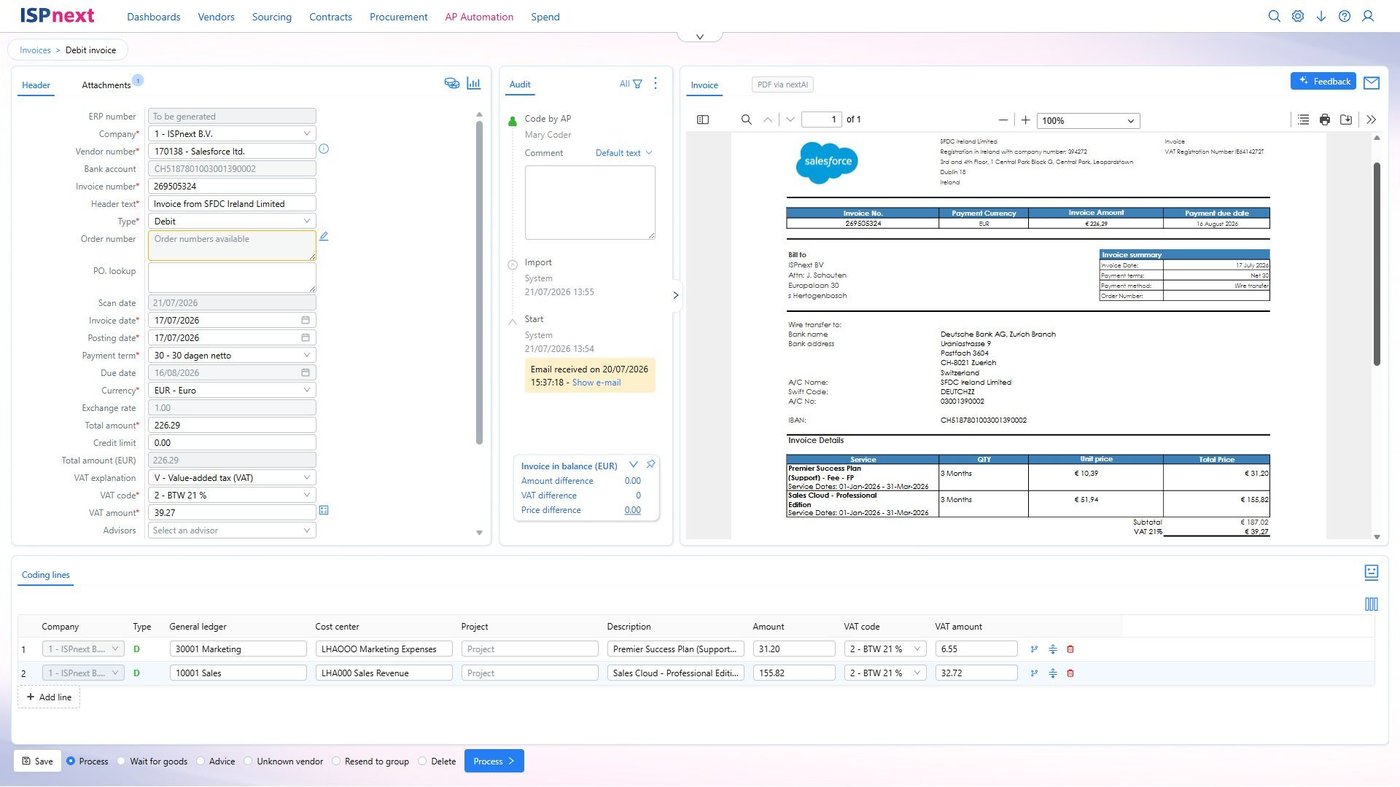
1. Process invoices digitally via email or e-invoicing

  • Incoming invoices in PDF or XML format (UBL, INSBOU, SALES) are automatically retrieved and read.
  • Paper invoices are easily scanned and emailed to a central email address.
  • Automatic classification of attachments via algorithms for optimal document recognition.
  • Efficient start of digital invoice processing from one central inbox.
AP Automation_Step 2

2. AI recognition of invoice data.

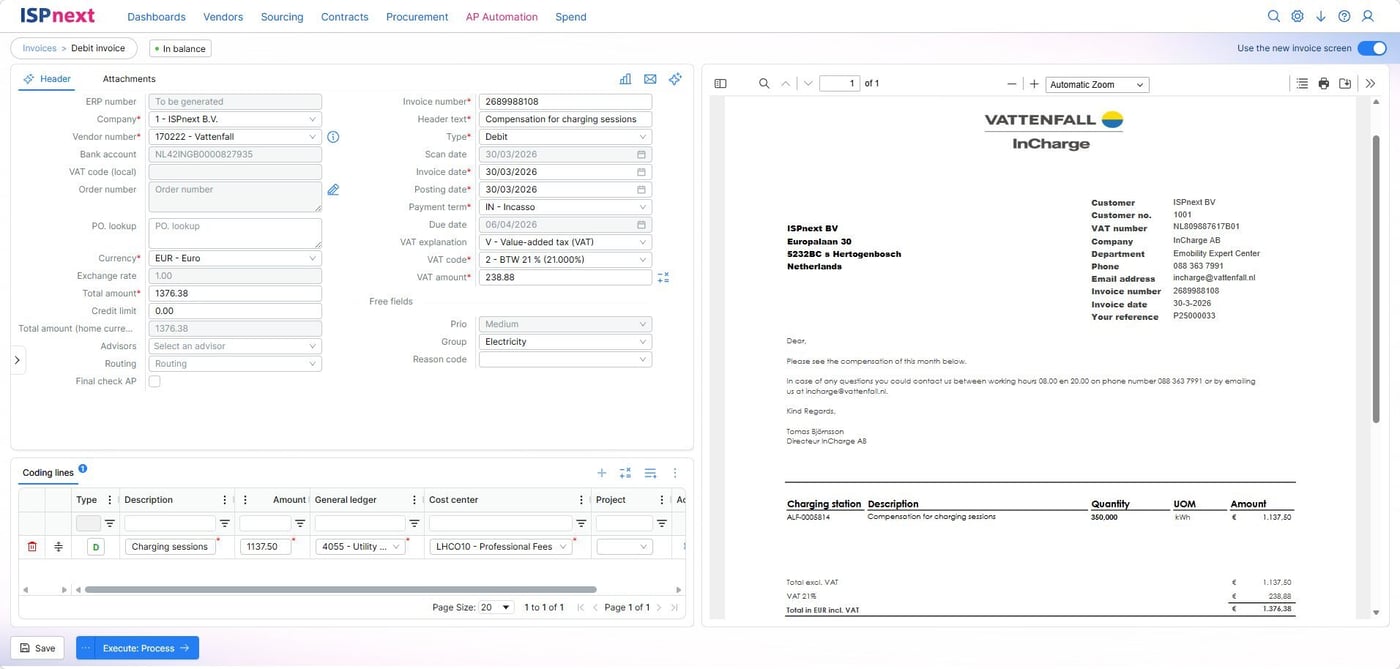
  • Important invoice fields such as invoice number, amount, VAT code and currency are automatically recognised.

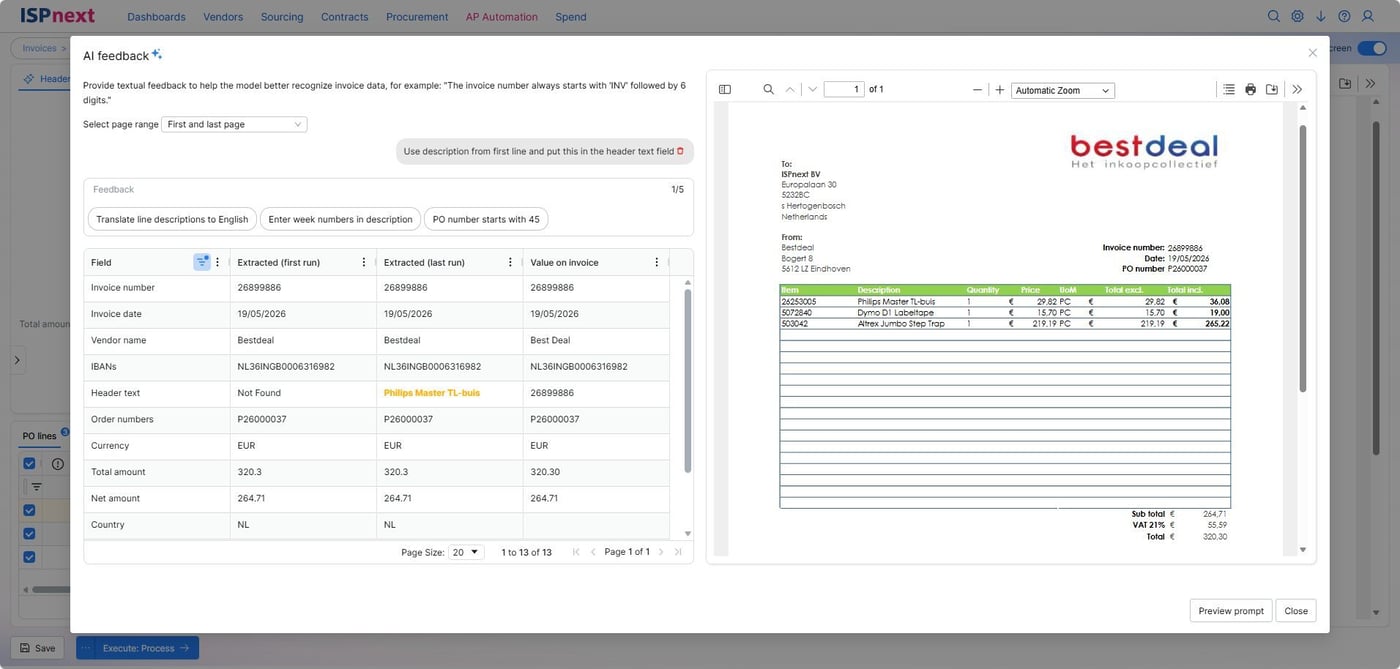
  • nextAI minimises manual entry and increases accuracy.

  • Templates per supplier optimise recognition of invoice data.

  • Fully automated recognition process in the background increases speed and efficiency.

AP Automation_Step 3

3. Automatically read invoices and match them with orders or contracts

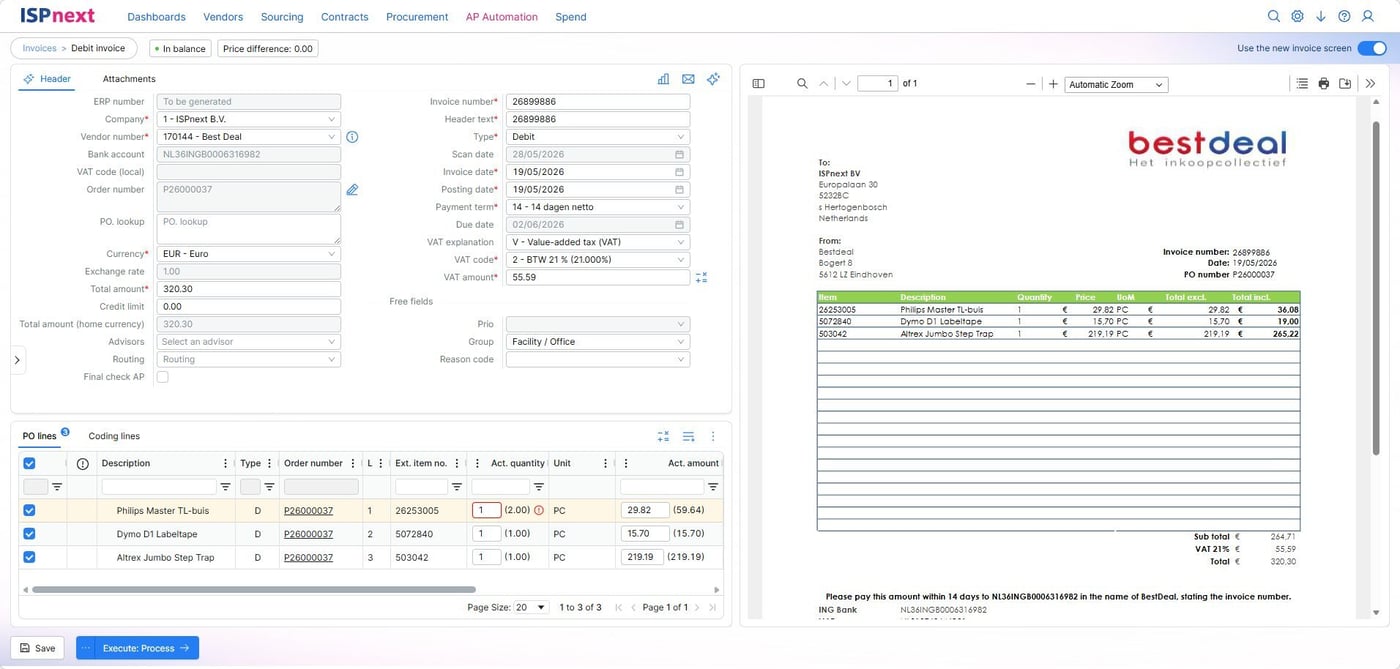
  • Automatic 2- or 3-way matching with purchase orders at header and line level.

  • Invoices with a correct match are booked directly into the ERP system.

  • In case of discrepancies, invoices are flagged for review or correction.

  • Processing based on match tolerances prevents unnecessary blockages in the workflow.

AP Automation_Step 4

4. Identify discrepancies and digitally approve invoices via approval flows

  • Advanced approval workflows with line-specific authorisation and procuration limits.

  • Invoices are automatically sent to the correct budget holder based on set workflows.

  • Ability to set alternate routes for price or quantity variances.

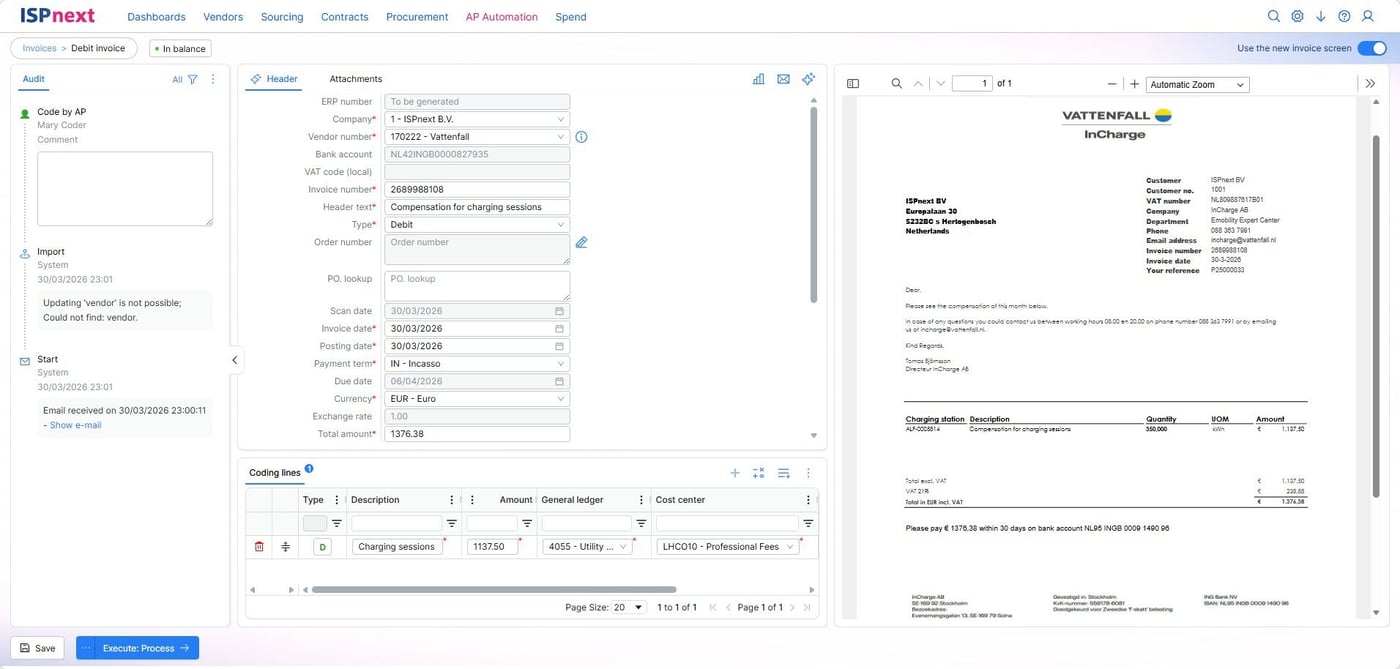
  • Full traceability via audit trails and real-time approval statuses.

AP Automation_Step 5

5. Booking in the ERP system, payment and archiving

  • Once approved, invoices are automatically posted and made payable in the ERP system.
  • Archived invoices are quickly findable through smart search filters and linked to accounts payable.
  • Full audit trail per invoice provides compliance and transparency.
  • Real-time visibility into outstanding liabilities and workflow statuses increases process control.

nextAI for AP Automation

Accelerate invoice processing with AI-driven accuracy.

Key benefits:

  • Faster invoice processing;
  • Fewer errors and exceptions;
  • Strong data security and control.

E-invoicing

Automate e-invoicing and remain fully compliant.

Key benefits:

  • Effortless compliance with laws and regulations;
  • Lightning-fast, accurate and automated invoice processing;
  • Strong financial control through ERP integration.

Dynamic Discounting

Realise immediate savings by paying suppliers faster.

Key benefits:

  • Increase financial efficiency through cost reduction and automation;
  • Improve speed and agility in payment processes;
  • Strengthen supplier relationships through transparency and timely payments.
Icon_AI stars

nextAI

Icon_E-invoicing Routty

E-invoicing

Icon_Dynamic Discounting_2x

Dynamic Discounting

Digital processing of purchase invoices: who is it suitable for?

AP Automation is for organisations that want control over their invoice processing and strive for maximum efficiency. Ideal for organisations in growth, with complex administrations or collaboration across multiple systems, vendors and teams.

The solution is particularly suitable for:

Emma AP Manager

Finance Manager

Finance departments that process invoices digitally and want to work faster and error-free.

Marc Procurement Manager

Procurement Manager

Procurement professionals who want to keep a grip on commitments, budgets and contractual agreements.

Alex IT Manager

IT Manager

IT project leaders looking for scalable and secure integrations with existing ERP systems.

Wouter Jelier - Louwman Group
"The software provides valuable insight and makes our processes more efficient and controllable."

Wouter Jelier, Finance Executive | Louwman Group

Why choose AP Automation?

300+

Organisations trust our invoice processing software

95%

Touchless processing of incoming invoices

50%

Faster approval due to fewer manual operations

100%

Insight, control and compliance within the invoice processing process

Icon_AP automation_2x_cropped

AP Automation in 5 steps

Download the whitepaper AP Automation in 5 steps and get valuable insights to cut costs, reduce errors and optimize your processes.

Mockup_Preview_AP Automation in 5 stappen (ENG)

Frequently asked questions about AP Automation

What is automated invoice processing?

Automatic invoice processing, also called digital invoice processing or electronic invoice processing, is the process by which incoming invoices are fully automated. Think of recognising, matching, approving and posting invoices without manual actions. This reduces errors, saves time and improves compliance.

How does automatic invoicing software work?

With automatic invoicing, invoices are received via e-mail or e-invoicing, automatically recognised and linked to orders or contracts. They are then digitally approved and booked into the ERP system. Thanks to invoice software, this is done quickly and in full control.

What are the benefits of invoice processing software?

With good invoice processing software, you process large numbers of invoices faster, error-free and with real-time visibility. You save time, avoid double payments and comply with laws and regulations. The software also helps you with digital invoice processing and invoice automation.

Can I manage incoming invoices from my ERP system?

Yes, with AP Automation you can manage incoming invoices directly linked to your ERP. The solution supports SAP, Exact, D365 and Infor, among others . This allows you to benefit from automated invoice processing within your existing systems.

What is AP Automation and why is it important?

AP Automation (Accounts Payable Automation) helps businesses process invoices fully automatically, from receipt to payment. It saves time, prevents errors, and promotes compliance.

What is touchless invoicing and how does it work?

Touchless invoicing means that invoices are processed without any manual intervention. This is achieved through AI, OCR, and automatic matching with purchase orders, ensuring maximum efficiency.

How does invoice matching work with AP Automation software?

With invoice matching software, incoming invoices are automatically compared with purchase orders or contracts. This prevents discrepancies, speeds up approval, and reduces manual work.

What features should good invoicing software have?

Good invoicing software supports automatic invoice processing, e-invoicing, ERP integrations, approval workflows, and a clear audit trail. This allows businesses to work faster and with greater transparency.

How do approval workflows function in invoice processing software?

Invoices are automatically routed through workflows based on predefined rules such as amount, budget holder, or department. This increases speed, control, and prevents delays in the payment process.

What is the difference between digital and electronic invoice processing?

Digital invoice processing refers to the complete process of automatically processing, approving, and posting invoices. Electronic invoice processing, or e-invoicing, focuses specifically on sending and receiving invoices in a digital format such as UBL or XML.

Our Source-to-Pay solutions

Whether choosing the right supplier, managing contracts or processing invoices, with ISPnext you manage the entire process efficiently and compliantly.

Solutions Add-ons

Source-to-Contract

Icon_Sourcing (white)

Sourcing

Source-to-Contract

Icon_Vendor Management (white)

Vendor Management

Source-to-Contract

Icon_Contract Management (white)

Contract Management

Purchase-to-Pay

Icon_Procurement (white)

Procurement

Purchase-to-Pay

Icon_AP Automation (white)

AP Automation

Insights

Icon_Spend Analytics (white)

Spend Analytics

Icon_Sourcing (white)

Sourcing

Optimise sourcing processes with supplier selection and market analysis.

Key benefits:

  • Accelerate and simplify RFx processes.

  • Negotiate the best terms and prices.

  • Shorten lead times and reduce process costs.

Icon_Vendor Management (white)

Vendor Management

Manage supplier relationships effectively with automated evaluations and performance monitoring.

Key benefits:

  • Reduce risk through visibility into creditworthiness.

  • Centralise supplier and policy information.

  • Build strong, trusted relationships with suppliers.

Icon_Contract Management (white)

Contract Management

Streamline contract management from creation to renewal with workflows and compliance monitoring.

Key benefits:

  • Centrally manage contracts and easily share with stakeholders.

  • Improve compliance with standardised templates.

  • Get real-time visibility into obligations and performance.

Icon_Procurement (white)

Procurement

Automate procurement processes with ordering systems and approval workflows.

Key benefits:

  • Order at negotiated prices and terms.

  • Reduce fraud and errors through authorisations.

  • Bring all spend together for optimal control.

Icon_AP Automation (white)

AP Automation

Accelerate invoice processing with AI and automated approval paths.

Key benefits:

  • Automate repetitive and time-consuming tasks.

  • Prevent erroneous or duplicate payments.

  • Pay on time and improve financial efficiency.

Icon_Spend Analytics (white)

Spend Analytics

Get deep insights into your spending patterns with comprehensive analytics and reports.

Key Benefits:

  • Get real-time insight into spend and savings potential.

  • Optimise decision making and procurement strategy.

  • Increase transparency and reliability of data.

Icon_nextAI (white)

nextAI

Icon_DORA (white)

DORA

Icon_E-invoicing (white)

E-invoicing

Icon_Procurement Team Management (white)

Procurement Team Management

Icon_Supplier360 (white)

Supplier360

Icon_Dynamic Discounting (white)

Dynamic Discounting

Icon_Rebate Management (white)

Rebate Management

Icon_nextAI (white)

nextAI

Make Business Spend Management processes faster, smarter and easier.

Key benefits:

  • Speed up the processing of invoices, contracts and purchase orders.

  • Minimise errors and exceptions.

  • Save time and money.

Icon_DORA (white)

DORA

Integrate DORA compliance into your processes and generate one-click reports.

Key benefits:

  • Automate DORA reporting.

  • Gain insight into operational and digital risks.

  • Implement an efficient and scalable approach.

Icon_E-invoicing (white)

E-invoicing

Process invoices digitally, securely and with regulatory compliance.

Key benefits:

  • Comply with national and European standards.

  • Automate validation and processing.

  • Strengthen financial overview with integrated control.

Icon_Procurement Team Management (white)

Procurement Team Management

Make the financial value of the procurement department visible.

Key benefits:

  • Gain full visibility into ongoing and future savings.

  • Increase collaboration and transparency among team members.

  • Centralise reporting for consistent decision-making.

Icon_Supplier360 (white)

Supplier360

Get a full 360° view of your suppliers in one central platform.

Key benefits:

  • Centralise supplier data for maximum reliability.

  • Identify risks in a timely manner through continuous monitoring.

  • Encourage collaboration and long-term relationships.

Icon_Dynamic Discounting (white)

Dynamic Discounting

Pay faster, save more and strengthen your cash flow.

Key benefits:

  • Increase financial efficiency and cost savings.

  • Realise speed and agility in payment arrangements.

  • Improve collaboration with suppliers through flexible terms.


Icon_Rebate Management (white)

Rebate Management

Utilise every bonus appointment, automatically and accurately.

Key benefits:

  • Centralise and automate all rebate agreements.

  • Ensure accuracy and compliance.

  • Maximise financial impact.