

Real-time budget management prevents overspending. Track expenses instantly with every request and stay in control.
See it before you order
The budget position is visible when you request, not afterwards.
Commitments counted
Open orders are included, so the picture is accurate.
No surprises
Overruns surface before they have happened.
Visibility of costs is essential for every finance department. But how do you prevent budgets from being exceeded without anyone noticing in time? Many organisations still track expenses manually or retrospectively, which entails risks. ISPnext's Budget Management addition shifts that moment of insight. Instead of reporting retrospectively, real-time control is now possible during the application process itself, giving organisations greater predictability and control over their total spend.
"You don't want to discover that a budget has been exceeded when receiving invoices," says John Schouten, Director of Product Management at ISPnext. "Budget Management gives users immediate insight while they are making a requisition. That makes all the difference."
Budget management as an integral part of your workflow
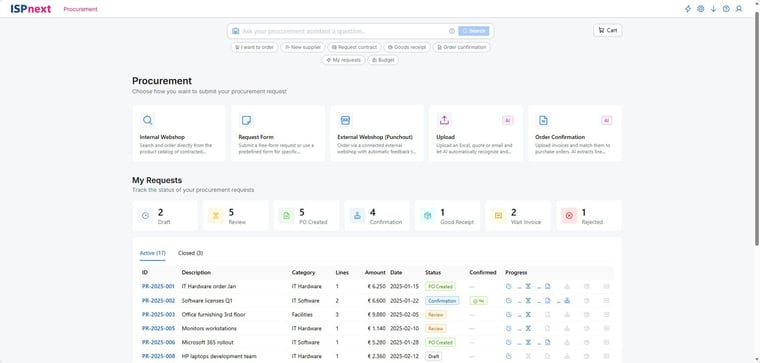
Budget Management is available as an extension within AP Automation and Procurement. What was previously retroactively possible via separate screens within Spend Analytics is now fully integrated into the user interface of AP Automation and Procurement. Employees receive visual feedback the moment they submit a requisition. This completely eliminates the delay between requisition and insight, resulting in faster and better-informed decision-making.
The technology is built on a completely redesigned architecture of Spend Analytics. This makes the integration sleek, stable and scalable. According to John, this is where the strength of this extension lies: "Budget management only really works when it is part of your existing process. Budget Management fits in perfectly with how users already work with our platform, without compromising on control or governance."
Spend Analytics in 5 steps
Fill in your details and receive the whitepaper “Spend Analytics in 5 Steps” immediately. Discover how to gain complete control over your expenditure and achieve strategic savings!
How does it work?
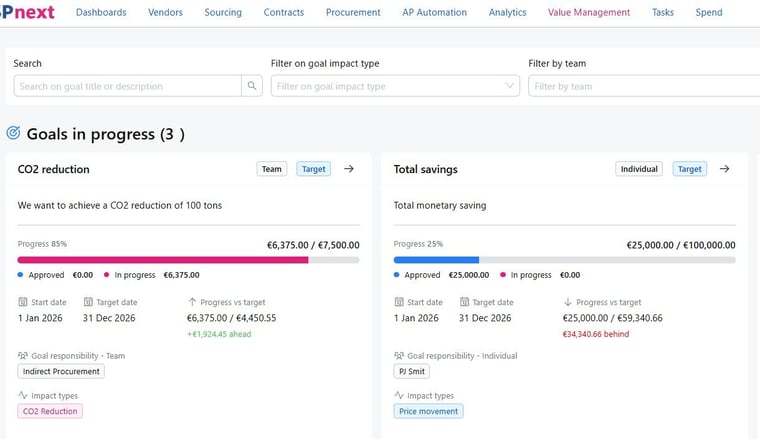
When creating a requisition, a clear progress bar automatically appears on the screen. This shows what the requisition will cost, how much of the budget has already been spent and how much is still available. This ensures immediate transparency and prevents approvers from having to intervene at a later stage.
If the requisition falls within the set budget, the process continues automatically. If the requisition exceeds the available budget, it is automatically blocked. In that case, an escalation route is immediately activated to the authorised budget holder or manager, so that the request only proceeds after explicit approval. This maintains ownership, controls financial risks and prevents delays due to subsequent corrections. "This prevents surprises for everyone involved," explains John. "Users can immediately see the impact of their requisition."
The benefits of real-time budget management
The integration of Budget Management offers concrete benefits for organisations that want to strengthen their budget control. Firstly, it prevents overspending by providing visual insight at the right moment. Secondly, it promotes budget responsibility within departments. Employees can see the consequences of their spending for themselves. "We make budget management tangible and directly applicable in daily practice," says John. For CPOs and CFOs, this means more control over spending, fewer exceptions and a more predictable spending pattern. A third advantage is that everything happens within the existing environment. Users do not need to open separate tools or consult reports. Everything takes place within the requisition flow. Moreover, the solution can be used flexibly for both centralised and decentralised budget structures. This means that Budget Management aligns with your organisation's working methods, regardless of the level of complexity or the number of budget holders.
“We make budget management tangible and directly applicable in daily practice.”
 John SchoutenDirector Product Management | ISPnext
Why now?
The need for better budget management is increasing. Organisations are under pressure to control costs and remain compliant with internal and external guidelines. At the same time, you want your employees to be able to work quickly and efficiently. Budget Management brings these worlds together. John sums it up: "We see that finance departments increasingly want to use data to manage proactively. This expansion helps with that. You gain control over expenditure without slowing down the process. That's where smart automation makes the difference."
Discover it for yourself
Would you like to experience for yourself how real-time budget management can help your organisation with spend control, budget governance and predictable decision-making? Request a demo and discover how the new Budget Management add-on works. Schedule your demo with ISPnext.Frequently asked questions
Budget management means monitoring your expenditure against pre-set budgets. Good budget management helps you avoid surprises and maintain control over your financial flexibility.
When submitting an application, a progress bar automatically appears showing how much of the budget has already been used and how much is still available. If the budget is exceeded, an escalation to the budget holder is initiated immediately.
You prevent budget overruns, encourage responsibility within teams and work more efficiently thanks to full integration into existing workflows. Everything happens within one familiar environment, without separate tools or reports.
Budget management can be applied in both centralised and decentralised organisations. Whether you work with fixed departmental budgets or project-based cost structures, the solution adapts to your working methods and supports every budget manager with clear insights.